

Look up a maker or a model.
System Information is a maker and model lookup. Choose a manufacturer, add a model if you have one, and each matching unit is listed with its type, year, refrigerant, charge and capacity. Look a model up before a visit, or check a plate you are not sure of.
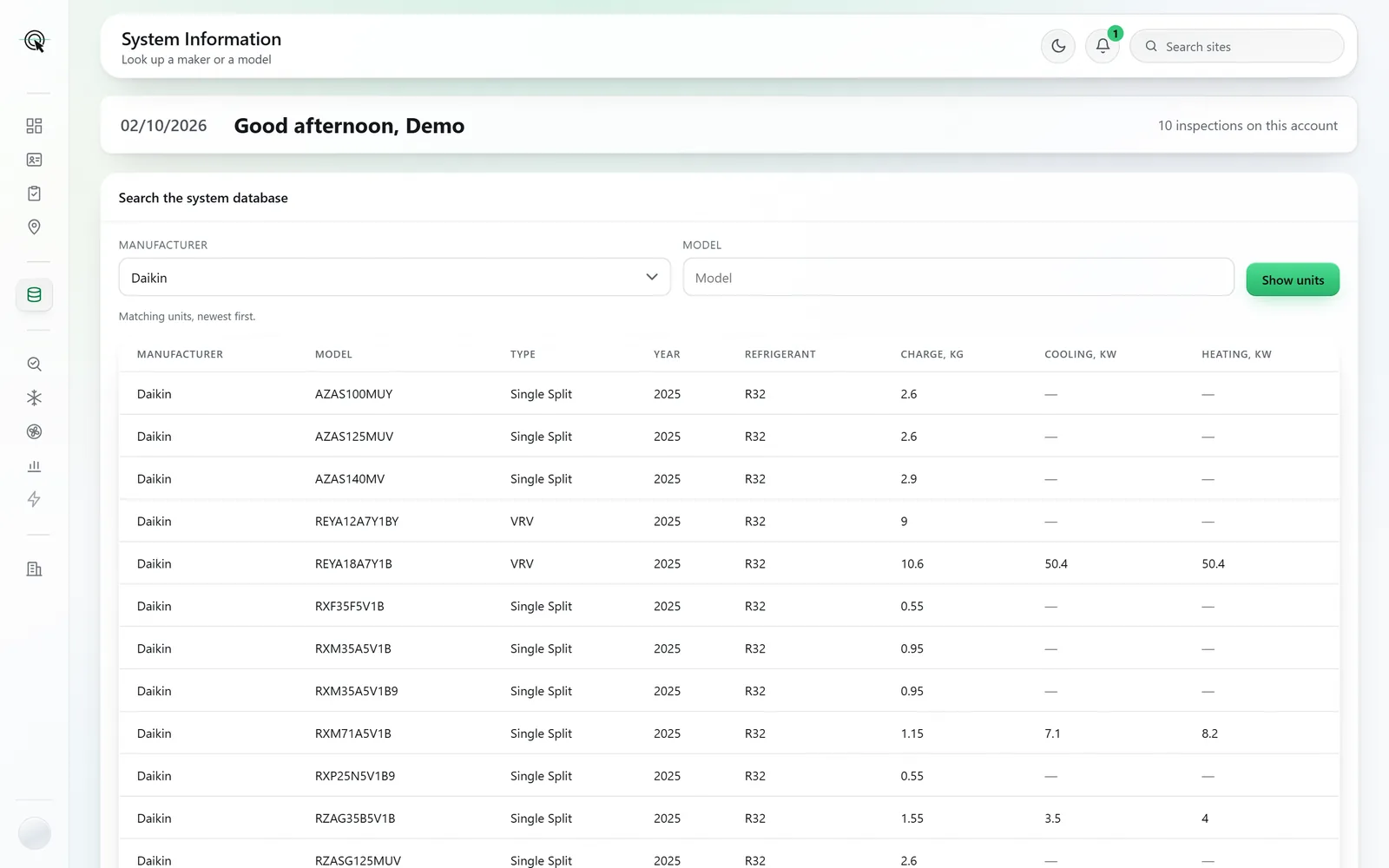
Screens and documents are from a sample account: the buildings, clients and assessor are made up.
- Maker and model lookup
- Each matching unit with its type, year, refrigerant, charge and capacity.
- It checks the plate read
- A misread character is caught before it becomes a wrong capacity.
- Rated capacity filled in
- The one figure the app takes from here, where the model gives it.
- Honest about each row
- A charge, a refrigerant and a system type are each labelled for what they are.
A second opinion on every plate.
It checks the read
When the phone reads a data plate, the model is looked up here, so a misread character is caught before it becomes a wrong capacity.
Rated capacity, where it is known
Cooling capacity is a property of the model, and it is the one figure the app will fill in from here.
Honest about what a row is
A charge is what THAT unit held, so it is never copied to another. A refrigerant is a cross-check against the plate. A system type is a suggestion. The screen says so beside each.
System Information is on every plan. Pay As You Go, Private and Corporate all include it, at no extra cost.
